Sailpro RaceHub - How to Use
Introduction
How to Create a Race
How to Join a Race
RaceHub FAQ's
Introduction
Introduction to RaceHub
RaceHub enables live race tracking via SailPro by logging each competitors GPS position, boat speed and Course over Ground (COG) every 10 seconds. Once competitors have entered and joined the race they transmit their real-time data through the SailPro app, letting organizers and spectators view the action live in any web browser. All race data is stored for review, offering affordable, professional-grade tracking functionality of yacht races. RaceHub can used for official race tracking or training and can be used to track one or multiple competitors.
What is the the general flow of RaceHub's race tracking functionality.
- SailPro RaceHub functions as closely as possible to the way Yacht Clubs normally operate races, ie Race Organizers (The Race committee, race officer or could be Sailing Coach) Creates the race and competitors can ENTER the race. (This means you can create races in advance of the start date and allow competitors to ENTER the race prior to the actual race date and time.
- On the race day, or just before the actual race start, the Race Organizer 'Enables Sign-On'
- Race Competitors can now Sign-on and start to transmit their race data.
- Every Race Competitor that activates Tracking will now start to transmit via the internet their - Latitude, Longitude, Boat Speed and Course Over Ground every 10 seconds to RaceHubs online mapping solution.
- When the Race Organizer is ready they can:
- Postpone Race - pause the race so that competitors stop sending race data. (Race organizers would use this feature if for example they have a delay in the race.)
- End Race - end the race completely which will prevent all competitors from transmitting race data.
- Abandon Race - Race will be stopped, all race data will be deleted and cannot be re-started.
Both Roles - Creating and Joining Your Own Races
You don’t have to choose just one. Many sailors use RaceHub as both organizer and competitor:
For example, if you’re training with friends, you might create the race (organiser) and also sail in it (competitor).
Your boat will appear alongside the others on the RaceHub map while you still control the race setup and sharing.
What to Race Viewers see
When viewers watch the race they are able to do so using the race url which is https://racehub.sailpro.race/racetoken
Viewers will be displayed the Racehub map with viewer controls as detailed below:
How to Create a Race
Race Organisers - Hot Create Races
Creating Races - 'How To Video'?
Creating Races - Step by Step Instructions
- To Create a Race simply navigate to the RaceHub section within SailPro and click +
- Click 'Create A Race (Requires a SailPro-X Subscription) Please note; Anyone with a SailPro Free subscription can join a race
- Enter the following:
Race Name - Mandatory
Race Date and Time - Mandatory
Race Location - Mandatory
Race Instructions URL (not mandatory, please note must begin with https://) - Not mandatory
Upload a Race Banner Image (not mandatory)
Check that you acknowledge the Race Organizer Agreement - Not mandatory - Click Create Race
Notes: - To create a race requires a SailPro-X subscription (competitors can join races with the FREE version of SailPro )
- Create different races for each race of a series. e.g. if you are organizing a regatta create a race for each individual race.
Share and Allow Competitors to JOIN a race
- Once you have Created a race click on View Details.
- Note the 6 digit Race Token next to the # underneath 'Instructions' (Example TGDTWR) Copy this token and provide via available means, email, text, WhatsApp, etc to Race Competitors who will use this token to Enter the race.
Race Day
- When the race organizer is ready (typically just prior to the race start) navigate to the race and click the Enable Sign-On button - this will enable competitors to now Sign On and subsequently start transmitting their location details.
- At any point a Race Organizer can:
- Postpone Race - pause the race so that competitors stop transmitting race data. Race Status = Race Postponed
Race organizers would use this feature if for example they have a delay in the race. - Resume Race - race can be resumed and competitors can continue transmitting their data. Race Status = Live
- End Race - end the race completely which will prevent all competitors from transmitting race data and the race cannot be re-started. Race Status = Race Ended
- Abandon Race - Race will be stopped and cannot be re-started. Race status = Abandoned
How to Join a Race
Race Competitors - How to 'Join A Race'
As a Competitor you can Join a race. To enter a race requires that you have a access to the the Races 6 digit token (Example TGDTWR). This is typically provided by the Race Organiser.
Please follow the steps below
1. Within SailPro's Home screen click 'RaceHub'
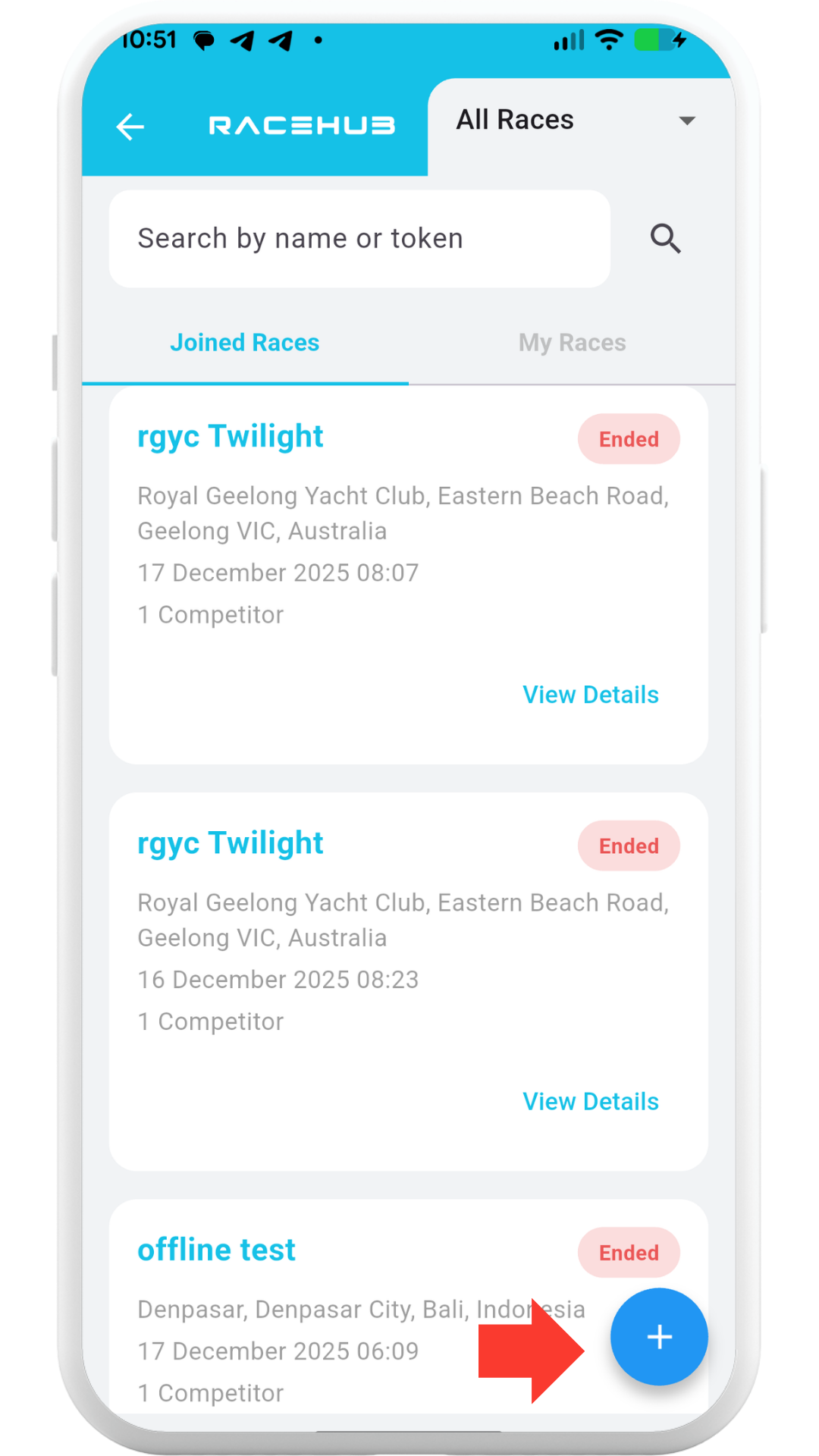
2. Click the + button on the bottom left of the RaceHub screen
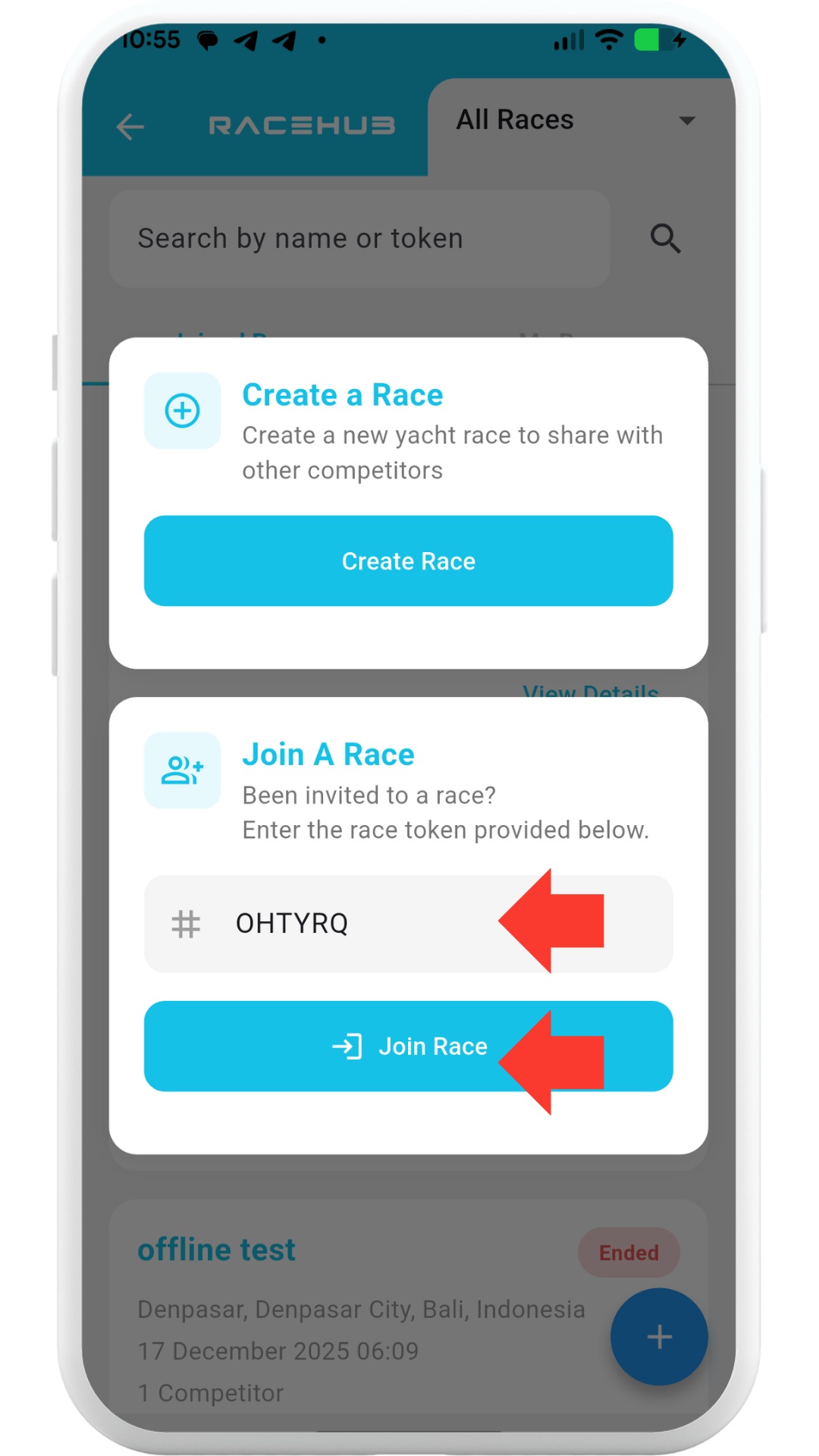
3. In the 'Join A Race' field enter the Race token provided (eg. QHTYRQ) and click the 'Join Race' button.
4. Click the 'Enter Race' button
5. Enter the Skippers First and Last Name and select your boat from the drop down box. If no boat exists click '+ Add a new Boat' and enter the mandatory field.
6. Complete the 'Enter Race Form' by entering your Sail Number, POB and accepting the T&C's, and click 'Submit'
7. You have now successfully 'Entered' the race.
8. Once the race Organiser has enabled 'Sign On' you (Typically the day of the race you can click 'Sign-On & Start Tracking.
9. Click 'Accept' to enable 'Background Location Access' and IF you haven't already done so, click 'Precise' and 'While Using The App'. Your device shall now connect to the SailPro RaceHub Server and start transmitting race data (Lat/Lng, Boat Speed and COG Data). You can now turn your device screen off and SailPro shall continue to transmit sending data. PLEASE NOTE: If you stop SailPro from transmitting your device shall disconnect from the Race Server and prevent SailPro from sending race data.
10. Post Race - When you have finished racing you can click the 'Sign off & Stop Tracking Button' to stop transmitting.
RaceHub FAQ's
Q. When can I enter the races?
A. You can enter races at anytime prior to
the race. Our strong suggestion is that
you enter each race as soon as possible if not all at the same time. Then on the ‘Race Day’ all you need to do is
‘Sign On’
Q. When can I Sign
On?
A. You can
only Sign-On once the race Organizer has Enabled Sign-On. Once
the race organizer has enabled Sign-On the race button will change
from Waiting for Race to Start to Sign-On & Start Tracking. Click
the Sign-On & Start Tracking.
Q. What happens IF
the Race Organizer Postpones the race?
If the race organizer
Postpones the race you will need to wait for them to enable Sign-On again to
re-join the race.
Q, What happens IF
I loose internet during the race?
RaceHub is able to
store race data (Lat/Lng, Boat Speed and COG) on the device. As soon as
the device reconnects to the Internet it shall upload this data to the RaceHub
servers.
Q. Can I join a
race from more than (1) device?
A. No. You can
only sign onto SailPro from 1 device. IF you 'sign in' to SailPro on
another device you shall log the other device out.
Q. Can I share the
race with friends and family?
Yes.
You can share the URL’s listed above with friends and family for them to
watch the racing live.
Q. What happens
with my data?
SailPro RaceHub
displays your boat name and live position while your race is available
to view. Your data is treated with the utmost respect and care and is
used only to enable live race tracking and post-race viewing.
Your race data is
visible only within the specific race you choose to join, and only while
that race remains accessible in SailPro RaceHub. It is not sold, not
used for advertising, and not shared outside of the RaceHub environment.
.